 PhotoCull
PREPARING FOR LAUNCH
Read the reason.
Make the call.
A burst of photos. Tiny differences. PhotoCull helps you see what is worth a closer look, with an AI review for each photo and keep/delete suggestions you control.
See a sample reviewFor Mac, iPhone & iPad
Photo analysis and AI inference stay on your device.
ONE BURST · NINE MOMENTS
Every photo has a reason.
Choose a photo to read its review.
AI-generated photos of a fictional adult. Reviews and picks are preset examples, not model measurements. This page does not run AI or access your photos.
See the differences.
Keep what matters to you.
- 01
Bring similar shots together
Review nearby moments as a group, instead of jumping back and forth through your library.
- 02
Read the review
Use comments on detail, composition and background as a starting point. Check the image for yourself.
- 03
Make your choice
Change a suggestion when the moment matters to you. You confirm what to delete.
Your photo library
stays yours.
PhotoCull runs photo analysis and AI inference locally. It does not upload your photos to a cloud AI model. Initial setup or a model change can require a download of several gigabytes.
Read the app privacy policy →A look inside the development build
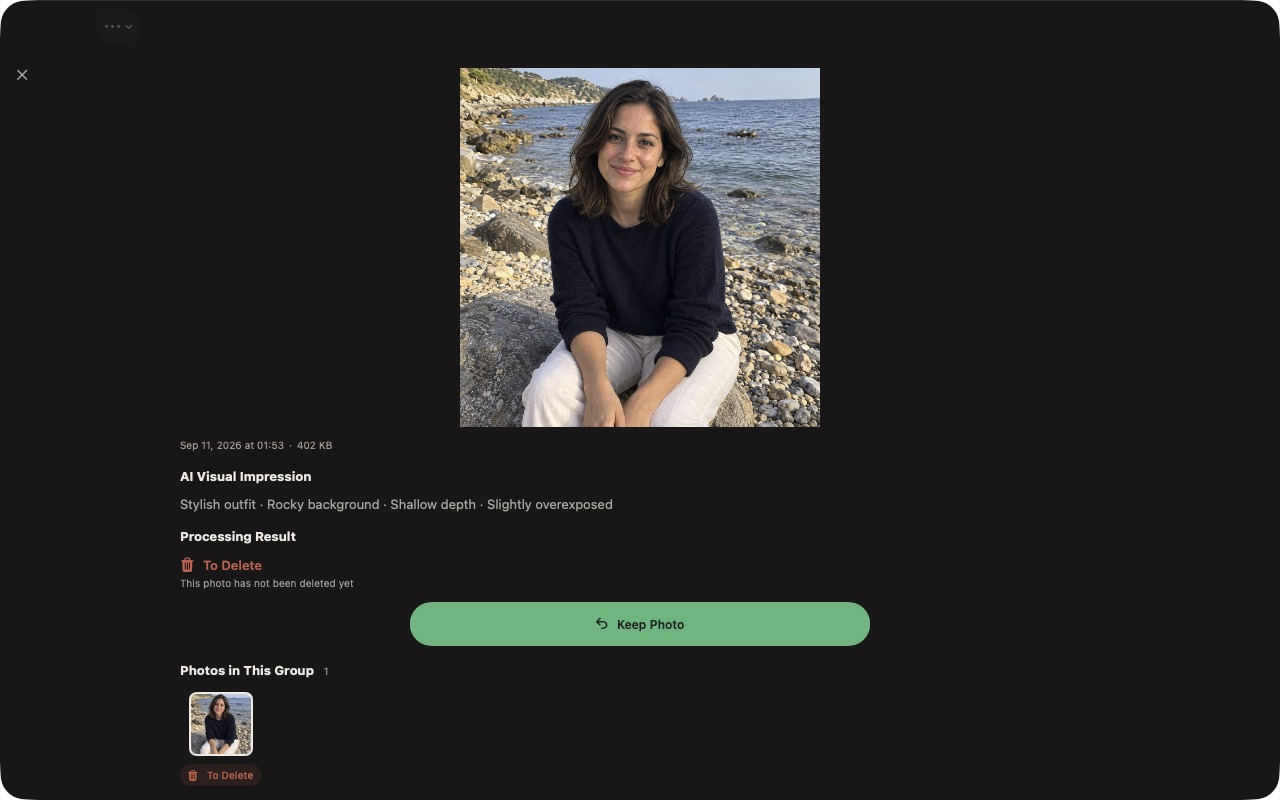
This screenshot shows the review screen and the option to keep a photo. The interface and sample result may change before release.
Before you try it
Can I download PhotoCull now?
PhotoCull is preparing for its first release. A public App Store or TestFlight download is not available here yet. You can send an expression of interest by email; this is not an automatic notification signup.
Which devices will it support?
The first release is planned for macOS 26+, iOS 26+ and iPadOS 26+, on Apple Intelligence-capable hardware. AI availability also depends on language, region, system settings and model readiness.
Does it delete photos automatically?
No. AI suggestions are advisory and you confirm deletion. iCloud Photos can synchronize deletions to other devices. Files selected from Mac folders may be deleted directly. Keep a separate backup of important photos.
Will it work with my entire iCloud library?
PhotoCull uses resources that can be read locally. Cloud-only photos may need to be made available in Photos first. It does not promise to analyze your entire cloud library.
What will it cost?
Weekly, monthly and yearly subscriptions and a lifetime purchase are being prepared. Available pricing and trial eligibility will be shown in the app and Apple’s purchase confirmation at release.
What if I disagree with the AI?
Keep the photo. A meaningful moment can matter more than sharpness or composition. Reviews can be wrong, and they cannot know a photo’s personal meaning.
PREPARING FOR LAUNCH
Start with one group.
Find your own keepers.
Interested in trying PhotoCull when a build is available? Tell us your device, OS version and the kind of photos you want to sort. Please do not attach private photos.
Opens your email app. Nothing is sent until you send the message. No automatic subscription or promised access date.
Photo review guide →